Kissena Forum Archive

Kissena Coaching Program - Velocious Coaching

1522 comments · 14741 views
Tim

Thanks for the webinar. Appreciate your recording it even with you having a cold. After checking out the offerings I think I figured out the following. Please confirm if this is correct:

First, I assume that at this point must of us would do well to choose one of the Full Season road plans. If I understood correctly, those of us on the previous plan should start on the 8th week of one of the full season plans, right? 

Next, it appears that most will load the Coggan Classic Zone workouts in order to have structured workouts on Zwift as well as Garmin devices, etc. The iLevel plans are only for WKO4 users. Am I correct in assuming that the workouts between iLevel and Coggan plans are the same with the exception of the zone/level differences?

Finally, the Masters plans appear to have fewer intervals and more recovery, but the blurb on the Velocious site seems to suggest you recommend it for those new to the sport. Can you clarify? 

For those who haven't listed to the webinar yet I'll repeat that members will be able to keep the plans in their training peaks accounts for future use but will be limited to 5 plans a year. Sounds pretty sweet. Thanks

Point 1: Correct, 8 weeks in.  Easy to do, just count weeks back.  Our team can help if people have questions.

Point 2:  Correct again in general.  The workouts are similar but some of the iLevels workouts are also "unique"  to time points in the power duration model.  Also, iLevels are not structured since they change with the model.  

Point 3:  Master plans are a little less intensity and more rest.  In reality, most riders that have been riding for 3-5 can train on the regular plans (40-50 yrs old), just beware of fatigue and take an extra day off here and there when tired.  New riders that might not have the training maturity, master plans work well for also.  If anyone needs help selecting, just post here and we can suggest. 

Point 4:  Plans are saved in your library. 
Big thanks to @TimCusick and the Board for setting this up. This is, I think, the ideal arrangement for club training plans. I'm excited. 
Thanks for the feedback.  We are getting good questions and sign ups and we are here to help! 
Hi Everyone! This is Kathy Watts, I am Tim's better half, also a coach and can help you with your training plan choices as that is part of my everyday job.  Looking forward to working with the team!
Welcome, Kathy! so great to have you with us!

Tim and Kathy

So I have WKO4 and have read about optimized intervals, etc. and would like to try that out some more... but I am in a build phase after CX season and don't think specificity is AS important as later in the season. Also I would like some structured workouts for the indoor trainer given how cold its been. my compromise is to load a classic plan for the next 8 weeks or so and then switch to iLevel plan(s) for rest of year. Does that make sense?


Patrick,
That is a terrific idea, giving you the best of both worlds...ease of structured on the trainer when most of the work is threshold or under and precision of ilevels later when you'll be doing more FRC/AC/Vo2 max work.  Good luck!
Sorry i missed the presentation. I really want to continue with what I've been doing which I believe has been the Cat3-5 plan. If that's the case should I sign up for the following::

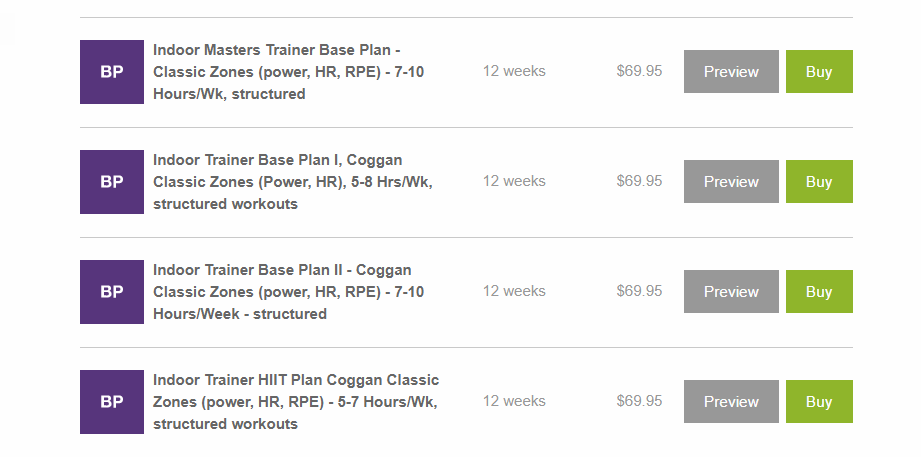
 1.4 Full Season Plan with Coggan Classic Training Levels, Power, HR, PE, 8-12 hrs/week, structured

I also like having an alternate trainer workout on the weekends in case we can't get out. Would that be included in this plan?

Thanks.

jeff
Patrick:

Jeff,

Yes, that plan is close the track we were on BUT you want to start it 8 weeks back dated so you are now in cycle three.  Just count back and apply to the right start date so that the next cycle is the third cycle of that plan (easier then it sounds and if you get it wrong, can unapply and apply again easily).  Hope that helps 
sooo.... How can i upload training plans into Z-wift?  is this a thing?
I'm working on it....
http://community.zwift.com/news/2209-structured-training-just-got-a-little-easier-download-your-trainingpeaks-workout-to-zwift

All coggan classic level plans are structured BUT iLevels are NOT.....
@TimCusick,

 I have some TrainingPeaks/WKO4 questions related to the Wahoo Elemnt Bolt.  I've had a mostly fruitful back-and-forth with TP folks, but there are a few unresolved questions.

First, is there a way to directly upload from the unit into WKO4?  I downloaded the Android to Mac program which Strava recommends to do direct upload from Bolt to Strava?

Second, It seems the preferred way to get activities from Bolt to WKO4 is to give Bolt permission to access TrainingPeaks, then Bolt will send the file over wifi to TrainingPeaks, then I need to press the sync button on WKO4.  I'm having two issues with this.  The first is that I have probably a year's work of workouts that I moved from WKO to TrainingPeaks.  So I'm worried about those being downloaded into WKO4.  It also seems that my WKO4 doesn't give me the option to download only, but rather either upload/download or no syncing at all.  I'd also rather not upload 12 years of data to the TP site at this time.  Is there a way to get TP just to send files from a specified time frame into WKO4 (or just since Friday)?  Can the upload/download button be toggled to download only or upload only in addition to upload/download or no syncing?

Third, if  I choose to put the workouts you devise onto the Bolt, which it seems like I can do with the Wahoo companion app, will it automatically delete the workout if the day has passed?  Will it load workouts for the future or does it just push the workout you need for that day?

I'd greatly appreciate your insight into this.  Thanks.
I don't use the Bolt and have only tested files so not a lot of help here.  That being said, just link it directly to your WKO4, should work fine.  Open WKO4 and plug in the device into the computer, wait to device is recognized. A small UI will pop up and ask you to select and assign athlete and check the little box to associate the device with that athlete (you) and it will auto upload in future (no UI pop up).

For the TP / WKO4 sync, single accounts are full synchronization as the goal is for them to be the same.  No way to control time.  Try this, set up a new athlete and then sync the whole account.  It will take a bit as there seems like lots of files.  Then you can see if everything accurate in that new athlete.  If so, use that account.

Hope that helps. 
Patrick pointed out I missed a part of an earlier question on weekend alternate training workouts.  I was writing them custom but the best bet to replace is to download an "Indoor Training Plan" giving you an outdoor and indoor option for each day?  Part of reason we allow multiple plan downloads. 
Tim I have figured it out thanks
Tim

I might just pick from the oodles of indoor workouts already populating TP over the past few months. What advice might you give about choosing an indoor workout to replace an outdoor ride? Do you pick something with a similar TSS or maybe similar focus (e.g. zone, efforts, etc)?

It occurs to me that the specifics of an indoor ride may not be as important as getting on the bike and riding, so jumping on Zwift and staying within the general zones/TSS may be sufficient, no?
Tim,
       Another WKO4 Question.

      My Quarq Elsa crank is malfunctioning.  (sending in tomorrow).  I know there's a way to overwrite erroneous power values in the Sensor Data tab.  However, I seem to only be able to correct a single data point at a time.

      Is there a way to do a bulk overwrite of power data?  Today, my NP was 432w for three hours.  I think that would put me on the WorldTour if it were accurate.  It should also generate a drug test.  My NP should have been in the 200-210w range.  Could I somehow just give myself a 200w AP by overwriting each power reading with 200? Is there a way to do this without manually inputting each data point?
Just delete the power channel and enter the estimated TSS, there really is no difference if you think about it, the power channel is bad, the only real reason you are estimate power is to get to TSS.  Here is a simple way to do it: https://help.trainingpeaks.com/hc/en-us/articles/208071207--Editing-data-in-WKO4-using-the-cut-and-clear-functions

There is a third part tool that will allow you to play with power, Google "Fit File Tool"
Hey Tim if today I upload a file to Training Peaks, then change my FTP which (new or old) FTP is used to calculate my TSS for that day?
In TrainingPeaks FTP is stored in the file itself so the answer should be "the FTP setting when you loaded the file".  That being said, I am not 100% sure as could be done when the server compiles.  I need to ask someone form that side of things, will get back to you and confirm
Checking in to see if everyone is getting their plans loaded and started correctly?  Any questions?
It’s working great for me. Even figured out how to upload structured workouts to my Garmin manually. I noticed there is no way to rename the structured workouts. Is that correct? Was trying to date them so it would be easier to work with. It’s no big deal otherwise. Thanks for checking in. 
Change the name before you upload them?
Yes. I have an older Garmin Edge so have to download them and upload through Garmin Connect. I tried changing the name before uploading but the name came up the same on the unit. Again it’s not a big deal just wondering. 
@TimCusick , I've got an Omnium this weekend in Crockett, TX (TT, Crit on Sat, RR on Sun).  I'm currently in week 10 1.4, which is pretty intense.

Any changes  you suggest making to my plan this week with the Omnium coming up?  This isn't an A race by any means, I generally see it as a chance to test where I'm at for the season.

Thanks